

Article
IBM Informix CDC: Logical Log Inspection via cdc_opensess API
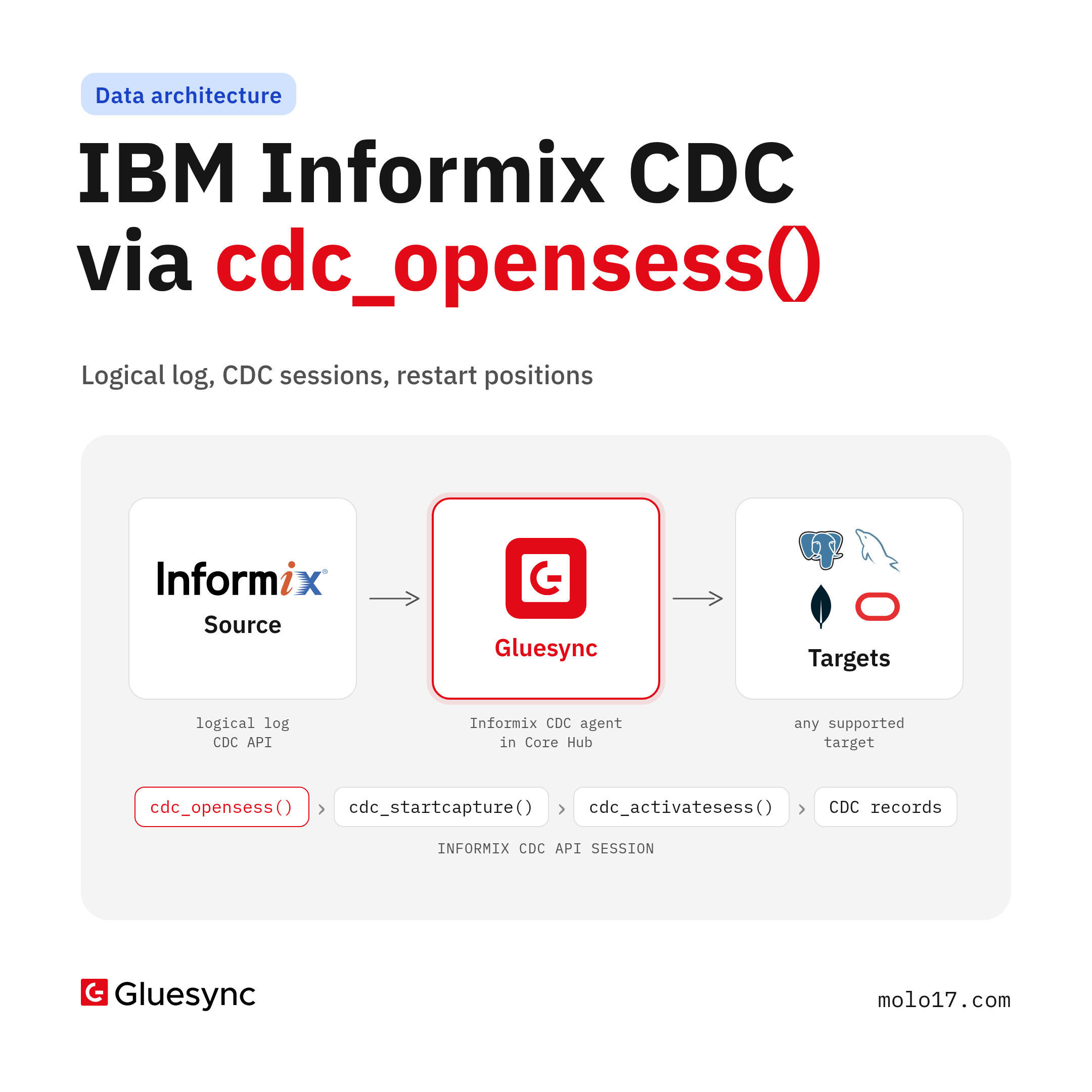
IBM Informix CDC reads the logical log through a native API in syscdcv1. cdc_opensess() opens the session; a production pipeline still needs transaction assembly, restart positions, an initial load and delivery to targets.
IBM Informix has a native Change Data Capture API. It reads changes from the logical log and hands them to a client as binary CDC records. cdc_opensess() is the function that opens that conversation. It is not the pipeline. Between the first cdc_opensess() call and a target that stays correct for months sit session lifecycle, transaction boundaries, restart positions, schema information, the initial load and recovery. This article walks through each layer, in Informix terms, and then shows where Gluesync takes over.
Docs: Informix agent · Informix CDC setup · Set up an Informix CDC source · IBM Informix CDC API Programmer's Guide (PDF).
What is IBM Informix CDC?
IBM Informix CDC is a set of built-in SQL functions, a system database and a record format that let an external client capture data changes from a logged Informix database. The functions live in the syscdcv1 database, which you create once by running syscdcv1.sql from $INFORMIXDIR/etc as user informix. You call them with EXECUTE FUNCTION from any client: JDBC, ODBC, ESQL/C or DB-Access.
The API captures four operations: INSERT, UPDATE, DELETE and TRUNCATE. It has hard limits worth knowing before you design anything around it:
- It captures only databases created with logging. A table in a database without logging cannot be captured
- It starts at the current log position. You cannot go back in time through the logical logs to read the history of a table, and you cannot seek at random
- It does not produce an initial snapshot of existing rows
- It does not capture schema changes. An
ALTER TABLEon a table under active capture fails - It does not capture TEXT and BYTE, user-defined types or collection types (
SET,MULTISET,LIST,ROW)
How the Informix CDC API interacts with logical logs
The logical log is where Informix records every logged change, transaction by transaction. The CDC API reads it and turns log activity into CDC records for the tables you asked for. You never parse log pages yourself.
The log is also a finite, circular set of files. Informix frees a logical-log file for reuse once it is backed up, no open transaction has records in it and it does not hold the oldest update not yet flushed to disk (IBM: Freeing of logical-log files). For CDC this matters for one reason: a restart position only works while the log that holds it still exists. When it is gone, the API returns CDC_E_LSN: data at the requested log sequence number is unavailable for capture.
Before any capture, each table needs full row logging, so the log carries complete row images:
EXECUTE FUNCTION cdc_set_fullrowlogging('demo:informix.customers', 1);
The first argument is <database>:<owner>.<table>. The function returns 0 on success, -83705 when the table does not exist and -83704 when its database is not logged. Set DB_LOCALE to the locale of the database you capture.
Opening and managing a CDC session
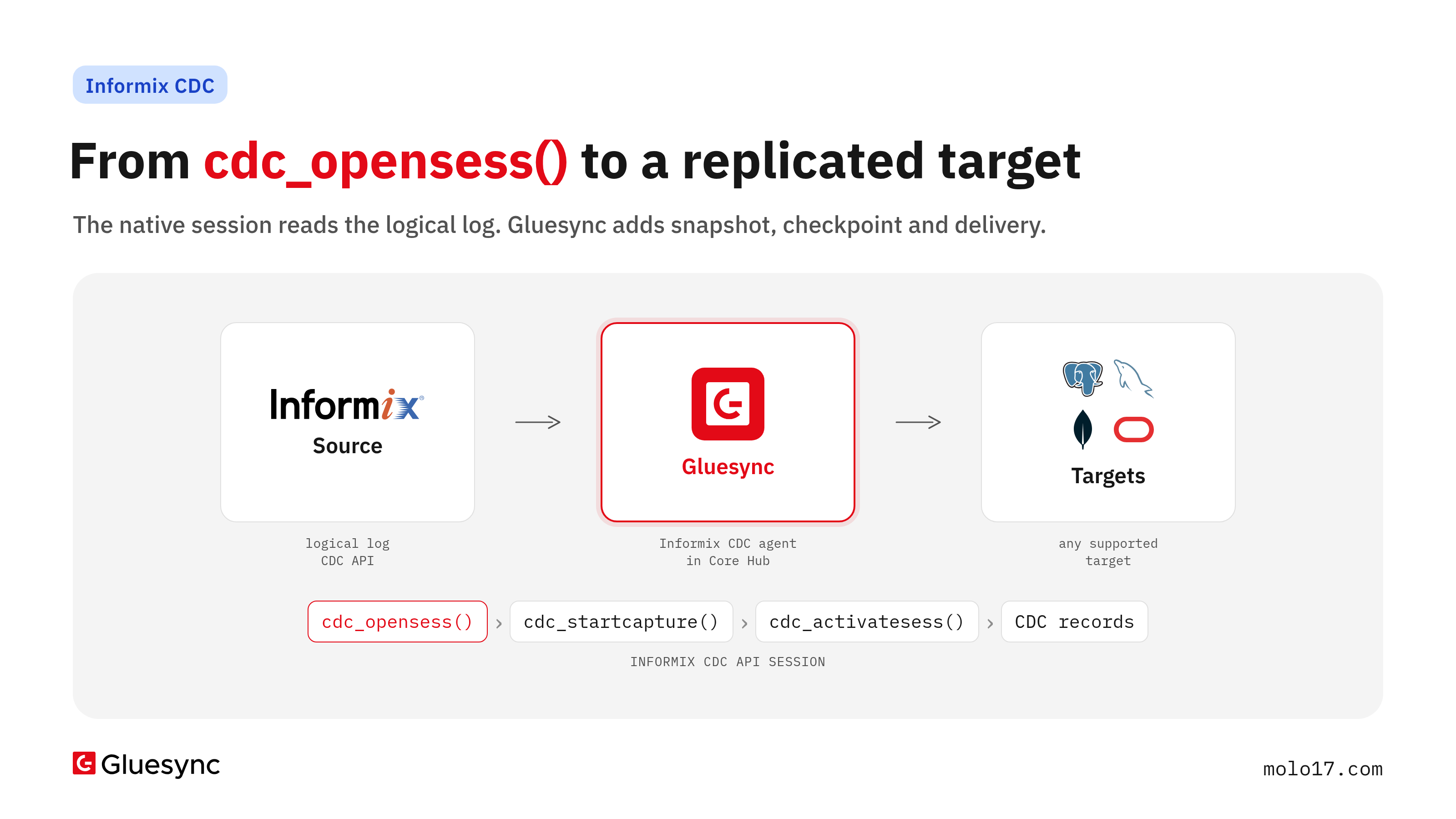
A capture session follows a fixed lifecycle, documented by IBM step by step (Writing an application to capture data changes):
- Connect to
syscdcv1on the server - Open a session with
cdc_opensess() - Turn on full row logging for each table with
cdc_set_fullrowlogging() - Pick the table and the columns to capture with
cdc_startcapture(), once per table - Start capture with
cdc_activatesess() - Read CDC records with a smart large object read function
- Stop each table with
cdc_endcapture(), then close the session withcdc_closesess()
cdc_opensess() takes six arguments: the server name (the server the client is connected to), a session ID that must be 0, a read timeout, the maximum number of records per read, and the API major and minor version (1 and 1 for new applications):
EXECUTE FUNCTION informix.cdc_opensess('ifx_server', 0, 60, 64, 1, 1);
It returns a session ID, and that ID is the interesting part: it is a smart large object file descriptor. You read changes by passing it to mi_lo_read(), ifx_lo_read() or, in Java, IfxLoRead(). Use the same read function for every call in a session. A timeout below 0 waits forever, 0 returns at once, a positive value waits that many seconds and then returns a CDC_REC_TIMEOUT record. Every application that uses the CDC API on the same server must pass the same major and minor version.
cdc_activatesess() takes the session ID and a position: 0 for a first start, or the sequence number of a CDC record from an earlier session to restart. cdc_startcapture() can run before or after activation: on an active session capture of that table starts at once.
From native change records to usable replication events
What comes back from the read call is a byte stream of CDC records, not rows. Each record has a header and a type:
CDC_REC_BEGINTX,CDC_REC_COMMTX,CDC_REC_RBTX: transaction begin, commit, rollbackCDC_REC_INSERT,CDC_REC_DELETE,CDC_REC_UPDBEF,CDC_REC_UPDAFT,CDC_REC_TRUNCATE: the changes, an update arriving as a before image and an after imageCDC_REC_TABSCHEMA: the column layout of a captured table, sent at the start of captureCDC_REC_DISCARD: records of the same transaction from this sequence number on must be thrown away, for example after a rollback to a savepointCDC_REC_TIMEOUT,CDC_REC_ERROR: no data in the timeout window, or an error
A read can stop in the middle of a record. The client has to stitch the parts back together. It has to buffer changes per transaction, apply them only on COMMTX, drop them on RBTX, honour DISCARD, and decode column values using the layout from TABSCHEMA. That is the gap between "the API returns data" and "the target receives correct rows".
Restart positions, interruptions and recovery
Most CDC records carry a BIGINT sequence number. IBM is explicit that it is not necessarily the LSN of the logical log. Within a transaction, sequence numbers grow. Across transactions, only the BEGINTX and COMMTX sequence numbers are in monotonic order.
The documented restart procedure follows from that:
- Find the captured transactions with no
COMMTXorRBTXyet. The lowestBEGINTXsequence number among them is the restart position - Open a new session with
cdc_opensess()and runcdc_startcapture()for the tables - Call
cdc_activatesess()with that position - Discard every transaction whose
COMMTXsequence number is lower than the highestCOMMTXyou already applied
So a custom consumer has to persist two numbers durably, at the right moment, and apply the discard rule on every restart. Get it wrong and you either replay committed transactions or skip some. And if the log holding the position has been freed in the meantime, there is no restart at all: only a new initial load.
Schema changes and operational considerations
CDC_REC_TABSCHEMA describes a table when capture begins. Later schema changes are not captured, and an ALTER TABLE fails while the table is under capture. A schema change on a replicated table is therefore a planned operation: stop capture for the table, alter it, start capture again, and bring the target in line.
The rest is operations. onstat -g cdc shows sessions, buffers, configuration and captured tables. Error codes are in the syscdcerrcodes table. Full row logging has to stay on while anything depends on it: IBM tells you to check that before you turn it off.
Native Informix CDC vs building a complete replication pipeline
| Native CDC API | Custom CDC application | Replication platform | |
|---|---|---|---|
| Reads the logical log | Yes, through CDC records | Yes, through the API | Yes, through the API |
Transaction assembly (BEGINTX/COMMTX/RBTX/DISCARD) |
Records only | You write it | Built in |
| Restart position and checkpoint | Position argument only | You store it | Persisted by the platform |
| Initial load | Not provided | You write it | Snapshot, then CDC |
| Schema information | TABSCHEMA at start |
You map it per target | Mapped per target |
| Delivery to other databases | Not provided | You write each writer | Target agents |
| Monitoring | onstat -g cdc |
You build it | UI, notifications |
The API is a sound capture layer. IBM documents it as the base for an application you write, not as a replication product.
How Gluesync approaches Informix CDC
The Gluesync Informix agent uses the Informix CDC API through the Informix change stream client (ifx-changestream-client), the Java library IBM ships with the Informix JDBC driver. It connects through the bundled JDBC driver and supports Informix 12.10 and 14.10.
What it adds on top of the session:
- Snapshot, then CDC. A new entity starts with Full copy: every row is copied, then the changes are followed. Where it stopped resumes from the saved position, Now skips what changed before the start (Start a snapshot and CDC)
- A persisted read position. After a restart of Core Hub the entity resumes from its saved position and reads on from the log. Since Informix agent 2.3.1.2 the read checkpoint is persisted at most every 200 ms instead of on every commit
- Ordered delivery. Each statement of an Informix transaction arrives in order, one change at a time. To write in batches, raise the entity polling interval (Informix Troubleshooting)
- Tuned reads. Since agent 2.3.1.0 CDC reads up to 64 records per round trip. The
CDC idle pause in millisecondssetting (default 100) sets the pause between reads when the stream is idle, andCDC client timeoutis exposed in Advanced settings - Recovery without a restart. If the user lacks the rights in
syscdcv1, the snapshot rows still arrive, the Control Plane showsError reading Ifmx CDC EnginewithRoutine (cdc_opensess) can not be resolved., and the entity keeps retrying until youGRANT DBA TO gluesync;insyscdcv1 - Any target. The same pipeline writes to the targets in the Gluesync catalog, with types mapped per target in the Field mapping dialog
Setup is the native setup: a logged database, syscdcv1 created, full row logging per table, a user with CONNECT and SELECT in the source database and DBA in syscdcv1, because the CDC functions run in DBA mode. Current limits on the source: set, blob and lvarchar(4096). The full walkthrough, with the error messages you will meet, is in Set up an Informix CDC source. The agent overview is on the Informix CDC page, and the original agent launch is in Informix agent for Gluesync. For log-based CDC in general, see Real-time replication with log-based CDC.
FAQ
Does IBM Informix support CDC?
Yes. Informix ships a native Change Data Capture API in the syscdcv1 database. It captures inserts, updates, deletes and truncates from logged databases and returns them as CDC records to a client application.
What does cdc_opensess() do?
It opens a capture session between a client and the server and returns a session ID, which is the smart large object file descriptor you read CDC records from. It does not start capture: cdc_startcapture() picks the tables and cdc_activatesess() starts reading at a position.
Does Informix CDC read logical logs?
Yes. The CDC API reads the logical log and returns its changes as CDC records. That is why it needs a logged database, and why a restart position is lost once the logical log holding it has been freed.
How does an Informix CDC process recover after interruption?
It opens a new session and activates it at a saved sequence number: the lowest BEGINTX of the transactions not yet committed or rolled back. Then it discards transactions whose COMMTX is lower than the last one applied. Gluesync persists the read position and resumes from it after a restart.
Is the native CDC API a complete replication solution?
No. It gives you the change records. Initial load, transaction assembly, restart state, schema mapping, delivery to other databases and monitoring are left to the application.
Next steps
- Check that your database is logged and create
syscdcv1, as in Set up an Informix CDC source. - Turn on full row logging for the tables you replicate.
- Add the Informix CDC agent as the source of a pipeline in Core Hub and start the entity with Full copy.
Want to see it on your Informix server? Book a demo or request a free trial.