

Article
GKO: Gluesync now updates itself on Kubernetes
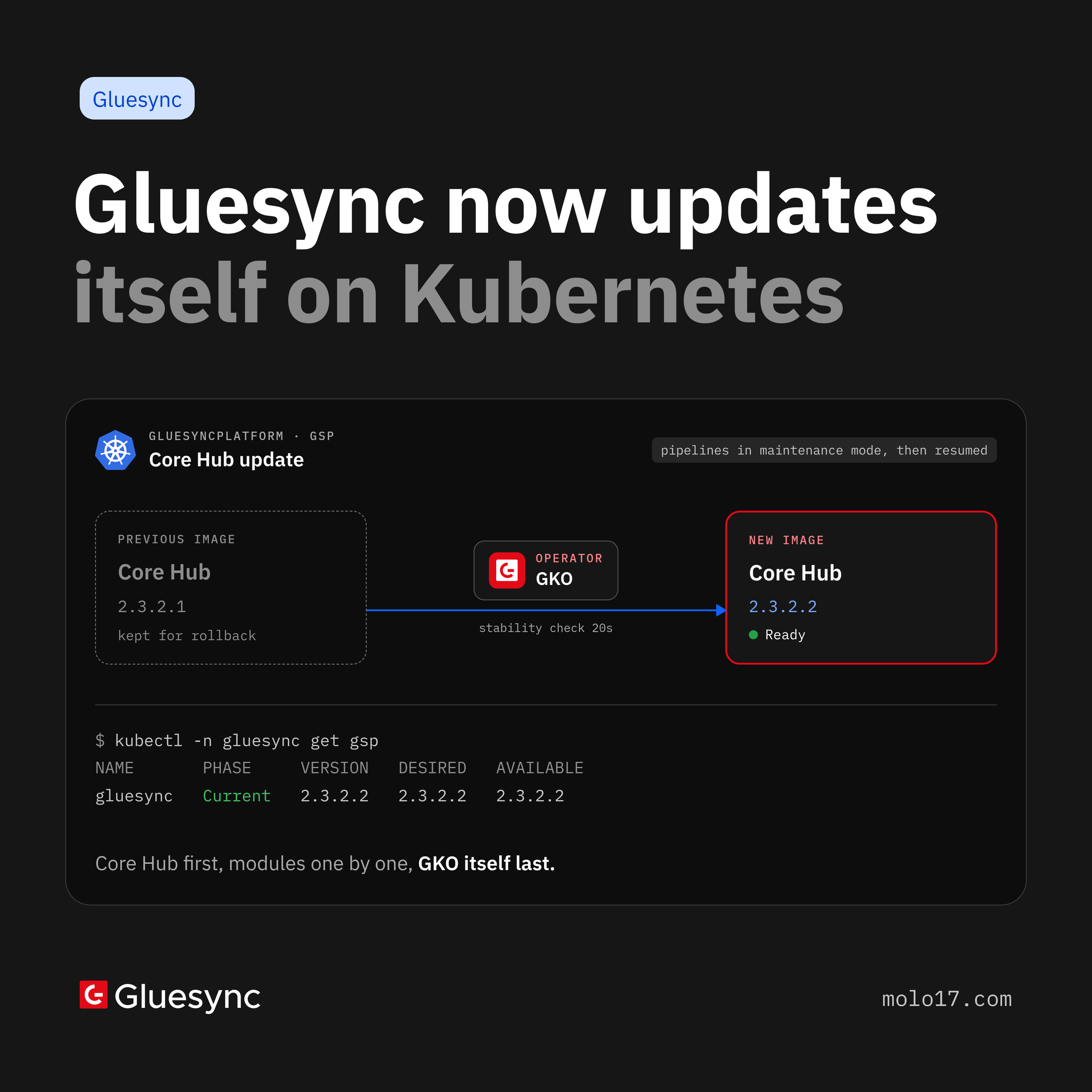
The new Gluesync Kubernetes Operator (GKO) updates Core Hub and its modules on Kubernetes from Platform updates in the Control Plane, as Conductor does on Docker. Pipelines pause in maintenance mode while Core Hub changes, and anything that does not come up is rolled back.
Gluesync now updates itself on Kubernetes the way it does on Docker. The NEW Gluesync Kubernetes Operator (GKO) runs next to Core Hub in your cluster: open Platform updates in the Control Plane, click Update all, and GKO moves Core Hub and its modules to the new version. Every running pipeline goes into maintenance mode while Core Hub changes, and anything that does not come up is rolled back on its own.
On Docker, Docker Swarm and Podman, Conductor has done this job for a long time. On Kubernetes, an update meant downloading a new kit and running helm upgrade by hand. GKO closes that gap and adds one rule Conductor does not have: no pipeline syncs while Core Hub is being replaced.
Docs: Gluesync Kubernetes Operator (GKO) · Install GKO · Changelog.
The same Update button, now on Kubernetes
GKO connects to Core Hub as its Conductor module, with your licence, and answers on the same /conductor/api path. For the Control Plane nothing changes: Platform updates shows what is available on your release channel, and Update all or a single component starts the update. You need no API token and no extra screen.
Behind the button, each Gluesync install has one Kubernetes resource, a GluesyncPlatform (short name gsp), that holds the Core Hub version it should run. A click in the Control Plane changes that version, and GKO does the rest. So does a kubectl patch, or a commit in Git.
$ kubectl -n gluesync get gsp
NAME       PHASE             VERSION   DESIRED   AVAILABLE   AGE
gluesync   UpdateAvailable   2.3.2.1   2.3.2.1   2.3.2.2     6d
What happens during an update
- Pipelines into maintenance mode. GKO lists the pipelines that are running, puts each into maintenance mode and waits until all of them report it. Pipelines you had already paused stay as you left them.
- Core Hub first. GKO changes the Core Hub image and waits until the new Core Hub stays Ready, by default for 20 seconds without a restart and within 180 seconds of the change.
- Pipelines resume as soon as Core Hub passes.
- Modules one by one. Chronos, Grafana, Prometheus and the other modules move to the latest version of your channel, each with its own check.
- A record of the update is kept in the resource: the result of each component, the pipelines paused and resumed, and the last 10 updates.
GKO keeps its progress in the cluster, so if its own pod restarts in the middle of an update, it carries on from the last finished step and still resumes the pipelines it paused.
Rollback without a pager
When Core Hub does not come up on the new version, GKO puts the previous image back, replaces the stuck pod, waits for Core Hub to be Ready again and resumes the pipelines. A module that fails is rolled back on its own while the rest of the update goes on.
GKO tells real failures from slow ones. A crash loop, or an image the registry says does not exist or may not be pulled, fails at once. A registry that is merely slow, such as a pull-through cache fetching a new image for the first time, gets the full wait before anything is rolled back.
Built for GitOps
If your cluster is managed from Git, choose who owns the version:
updatePolicy: ui: updates start from the Control Plane. Git sets the first install, and Argo CD is told to leave alone the fields GKO changes.updatePolicy: gitops: the Control Plane cannot start updates. You commit the new version, Argo CD applies it, and GKO still runs the update with maintenance mode, the stability check and rollback.
Either way, a later helm upgrade or Argo CD sync never undoes an update or replaces Core Hub behind GKO's back. The GitOps guide has the ignoreDifferences to copy.
Air-gapped and private registries
GKO reads the available versions from the same MOLO17 catalog as Conductor. Offline installs switch that off and pin the versions in the resource; private mirrors are one setting (imageRegistry), and every image GKO sets is pulled from there.
Least privilege, one namespace
GKO works in the namespace of its Gluesync install and nowhere else. It changes only the image of the workloads labelled as Gluesync components: replicas, resources and volumes stay as Helm installed them. Its role can read only the Secrets named in its own resource, such as the one that holds your licence. GKO is open source, like Conductor.
Get it
New Gluesync Kubernetes kits install GKO next to Core Hub, with the Traefik route the Control Plane needs. For an existing install, GKO has its own Helm chart: label your Gluesync workloads, install the chart in the same namespace, and Platform updates works from then on. Both paths are in Install GKO.
Next steps
- Read the GKO overview and how an update runs.
- Download a new Kubernetes kit from the Gluesync download page, or add GKO to the install you already run.
- Open Platform updates in the Control Plane and update from there.
Running Gluesync on Kubernetes and want to see GKO on your cluster? Request a free trial or book a demo.