

Article
Gluesync 2.3.0: AI Studio, Enterprise brain, and a Fields Editor you draw
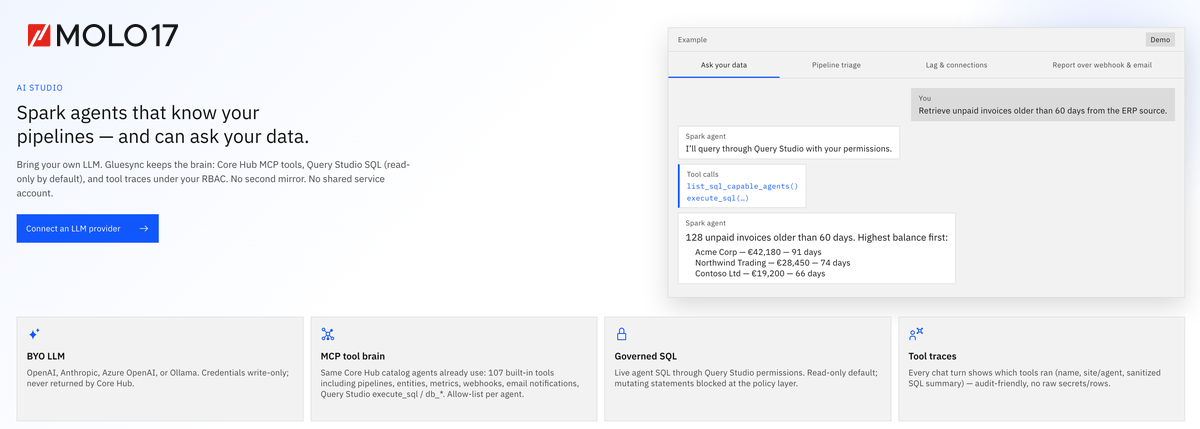
Gluesync 2.3.0: bring your own LLM providers in AI Studio, share an on-prem Enterprise brain, choose insert conflict rules, and map fields by drawing arrows.
Gluesync 2.3.0 is generally available as of 13 October 2026. This release puts model choice, write rules, and field mapping under your control: AI Studio runs on LLM providers you register, the Enterprise brain keeps shared schema memory beside Core Hub, every insert conflict strategy is a per-entity choice, and the Fields Editor draws source-to-target mappings as arrows.
Version 2.3.0 is the largest Gluesync drop to date across Core Hub modules. Below is a concise overview of the headline capabilities, fact-checked against the official release notes.
Meet Spark
Spark agents live in Gluesync AI Studio. Bring your own LLM: Spark works through Core Hub MCP tools and governed, read-only Query Studio SQL under your RBAC, and every tool call leaves a trace. Build reusable, versioned agents with the agent harness, route them through the model gateway, and call them from your applications with Spark agent APIs. Discover Spark.
AI Studio: your models, your keys, your rules
AI Studio is a workspace inside the Control Plane where you register your own LLM providers and operate governed Spark agents. Bring OpenAI, an OpenAI-compatible endpoint, Anthropic, Azure OpenAI, or a local Ollama instance. Credentials live in an encrypted vault that only super admins administer, with optional token prices so estimated spend is visible before finance asks.
- Agents run as the signed-in user, with a per-agent tool allow-list — RBAC stays in force, and each agent reaches exactly the tools you handed it
- Publish immutable skills and versioned TEXT agents, then start asynchronous runs with duplicate protection, redacted outcomes, and a durable SSE timeline. Conversations are searchable, with retention you control
- The fixed eight-round tool cap is gone. A loop policy bounds each turn by step ceiling, identical-call fingerprints, failure streaks, duration, and cost, and records why it stopped. Published run steps persist so a Hub restart resumes what is safe or marks an at-most-once write ambiguous
Governance and APIs for AI workloads
Route against a canonical model catalog by capability, context, residency, health, price, and weighted quality — and preview inclusion or exclusion before a request runs. Owner and API-key budgets, scoped one-time gsa_ secrets, rate limits, usage accounting, and an audit trail ship with the platform.
Native /api/ai/v1 plus OpenAI-compatible /v1/models and /v1/chat/completions support streaming, the Responses API format, embeddings, automatic model fallback with circuit breaking, exact response caching (per owner, API key, and model), and redaction-aware Prometheus/OTLP telemetry. GET /api/ai/v1/capabilities lists only what that node actually runs.
Pipeline mutation tools stay confirmation-gated: the first call is a pending action; an explicit confirmation within five minutes runs it. Destructive tools park in chat with Confirm / Cancel; API-key and Chronos writes wait at WAITING_APPROVAL for a signed-in human. Credentials stay redacted throughout.
Spark across Query Studio, pipelines, and Chronos
- Query Studio AI helper — a chat that already knows your schema, plus suffix-only Tab ghost-text autocomplete that proposes what comes next and never rewrites what you typed. Same vault, same keys; classified PII cells are never sent to the model
- AI as SQL — the Hub-owned read-only
gluesync.aicatalog is served by Query Forge like any other table, so anything with a JDBC connection can runSELECT … FROM gluesync.ai WHERE question = …and get rows back. See AI as SQL - Pipeline creator — keeps an ordered multi-pipeline plan in the conversation, resumes the first incomplete item on continue, and leaves Draft through the same completion transition as the wizard once the final SOURCE and TARGET are attached
- Ask Spark — every chat gets read-only
search_documentationandsearch_support_knowledge, cited only from what they return onhttps://docs.molo17.com - Chronos — Schedules and Events open a Spark panel grounded on that page; Chronos 0.3.0 can run a published agent through
ai_agent_run, with prompt templates, payload allow-lists, and loop guards. Every write waits for confirmation
Enterprise brain: one shared memory on your infrastructure
A dedicated gluesync-ai-brain.db beside gluesync.db holds the schema graph (including foreign-key edges from MySQL, MariaDB, Oracle, SQL Server, and Db2), agent memory, conversations, skill attachments, and approved company tools. Memory is shared by default across everyone who uses an agent; say "keep this private" and it stays yours. Memory records location and procedure — never rows or secrets.
Keyword search is always on; embeddings are offered when a model with the EMBEDDINGS capability exists. Company tools come from a preset gallery (Slack, Gmail, GitHub, GitLab, Notion, Microsoft Agent 365 servers, and others) or a custom HTTPS MCP server, then publish as tool-bundle skills. Outside clients use MCP tools such as list_published_agents, start_agent_run, get_agent_run, publish_skill, and search_enterprise_brain under the caller's permissions. You own it, you control it, and it is not SaaS.
Write path: you choose the rules
- Insert conflict strategy — per entity, pick
UPSERT(default),SKIP, orFAILwhen an insert lands on a row already in the target - Scalar function call — a field function writes a target-side scalar function into the statement in place of the bind placeholder (Oracle
pkg.f_…, and the same shape on other RDBMS writers that opted in) - Custom Field Functions — pipeline-level reusable Java functions: publish and install a collection, bind a target column in the Fields Editor with several source columns or fixed values as arguments, share across entities and UDFs, and try it in the test panel first. See Custom Field Functions
- UDFs grow up — array and map columns no longer brick the editor, and every UDF receives an
isSnapshotflag to tell the initial load from CDC. Field functions and UDFs can run together: the UDF reshapes the row first, field functions run on its output
Fields Editor: draw the mapping
A gutter sits between the source and target tables, and every relation is an arrow you drag from one dot to another. Click or keyboard works too.
- Every supported shape on purpose: 1:1, N:1, 1:N, a source you read but do not write, and a target column fed only by a field function or the UDF. M:N is refused
- Arrows are proposed by name (exact case first, then a unique case-insensitive match) or by ordinal position. Reset mapping restores the proposal; Clear mapping removes every arrow
- Keys follow the arrows. A source primary key cannot link to a non-key column of a target that has a primary key, and the editor tells you why
- Undo removes one step at a time; scroll lock keeps both tables and their arrows moving together
- Saved columns that discovery no longer returns drop only their own arrows; a target column gone from the database stays tagged "No longer in the database" and blocks save until you delete it
Unlocked schemas from earlier releases are no longer supported. The first edit of an unlocked entity migrates mapping and keeps UDF, settings, filters, and key mapping until you save. See the Fields Editor docs.
Also in 2.3.0
- MCP catalog at 125 tools — pipeline authoring, Chronos, notifications, Validator, saved queries, PII classification, docs search, and AI agent tools on the same Core Hub MCP server and bearer token
- Data governance — PII discovery and masking in Query Studio and the Fields Editor; connection-scoped data access matrices; custom access templates
- Connectors — ClickHouse target via
ReplacingMergeTree; SQL Server automatic CDC / Change Tracking activation (off by default); streaming before-image on Kafka, Solace, and Google Pub/Sub - Data Validator — asynchronous, cancellable per-entity comparison with persisted differences and optional reconciliation
- Smart alerts v2 — learns each entity's cadence before calling it inactive; baselines survive a Core Hub restart
Deploy Gluesync 2.3.0 today
Gluesync 2.3.0 is production-ready for cloud, virtualized, containerized Kubernetes and OpenShift deployments. As with every major update, Gluesync may require a few minutes to restart after the update is applied. Test in a dedicated environment before moving to production.
For the full changelog and configuration detail, read the official Gluesync 2.3.0 release notes.
Ready to put AI Studio, the Enterprise brain, and the new Fields Editor to work in your estate? Request a free 30-day trial.